HOME ----ABOUT----AWARDS----CONTACT

Wednesday, February 6, 2008

4 Things Meme

I've been tagged by Christy to do this one - it looks like fun! :)

Four jobs I’ve had:
1. Cashier/Greeter/Service Desk at Target
2. Zoning Administrator for a local city
3. Computer instructor (part-time) for a local adult/community ed.
4. Administrative Assistant

Four places I lived:
1. Southfield, MI
2. Kalamazoo, MI
3. Bay City, MI
4. Midland, MI

Four movies I’ve watched over and over:
1. The Parent Trap (new version)
2. Fly Away Home
3.One Fine Day
4. Sleepless in Seattle

Four shows I watch:
1. Grey’s Anatomy
2. Heroes
3. American Idol
4. Criminal Minds

Four places I’ve been:
1. Orlando, FL
2. Ocean City, NJ
3. San Francisco, CA
4. Toronto, ONT

Four people who e-mail me regularly
1. Cheryl
2. Kristi
3. My sister-in-law, Terri
4. Karen

Four favorite things to eat:
1. Domino's pizza
2. Anything chocolate
3. Pot roast
4. Breadsticks and pizza sauce

Four places I’d rather be:
1. At Lake Michigan
2. Anywhere warm and sunny... :)
3. Home
4. Disney World

Four things I look forward to this new year:
1. Spring!
2. Getting together with friends (all of them!)
3. Getting to know blogging friends better
4. Getting caught up on our bills

Four people to tag:
Kristi
Anna
Tammy
KC

Vote for my post on Mom Blog Network add to sk*rt

While Mommy's been sick...

What have the girls been up to?

Well, let's see. Dominos are fun to play with (and don't mind the hair that doesn't get brushed, much less done, when I'm out of commission)...AbbyPlayingDominos

HannahPlayingDominos

And they helped out by 'cleaning' the house.

HannahVacuuming_002

Daddy read lots of books. Or rather, Daddy read the same book lots of times.  :)

BeccaSittingWithDaddy_001BeccaSittingWithDaddy_002

And oh yes. There's always the television...

BeccaWatchingTV

Hmm, I think it's a good thing that I'm starting to feel better!

Vote for my post on Mom Blog Network add to sk*rt

Tuesday, February 5, 2008

Wordless Wednesday #30 - Hard at work

Hannah&BeccaPlayingInSnow_003

Check out more Wordless Wednesday here and here!


Vote for my post on Mom Blog Network add to sk*rt

Yep, 'just' a virus...

Don't you just love spending money to find out that there's absolutely nothing the doctor can do? To be honest, I figured that it's what I would hear, but also decided that it was worth spending the $20 co-pay to make sure.

So I get to spend up to another week with this - although if I start running a fever next week or coughing up blood, then I'm supposed to go back in (you think?!) because it could turn into pneumonia or bronchitis. One of my co-workers just told me that he's had this bug (or a similar one) for going on a month now.  A month?!

At this rate, Mary's baby is going to hit kindergarten before we get a chance to get down to see him, LOL. But I definitely don't want to pass any germs along, so we'll see how I'm feeling by the weekend and whether or not anyone else has come down with this by then.

So otherwise, everything's pretty much the usual here. Back at work today - don't know how much I'm actually getting done, but I'm here. The girls have choir at church tonight, but I think we may skip that (again...) so I don't expose everyone there to whatever nasty virus this is. Besides, after spending last night out rushing around, I think I feel like staying put at home tonight. Maybe I'll even feel well enough (and get motivated enough) to pick a few things up around the house or fold some laundry. Or maybe not.  :)

I'm sorry this is such a dull, boring update - hopefully I can dig up some interesting and/or funny tidbits to post soon!

Vote for my post on Mom Blog Network add to sk*rt

Heads or Tails #21 - First or Last

Ok, well first of all - sorry this is late! It may even be the last H0T posted today...   :)

I'm not feeling much better than I was on Sunday - or yesterday (I took the day off and slept for 5 hours straight), so I'm headed into the doctor in about an hour to see if it's 'just' a virus or if there's something else going on. Thank you so much for all of the well wishes!

Yesterday was the first day of the new session for Hannah's cheerleading, which meant that I had to drag all 3 kids out there in order to get her signed up, even with feeling miserable.  Unfortunately, they've made a scheduling change since last session - Hannah's group (level one) now starts at 6:00 pm instead of 6:15 pm. Ok, well picking up the kids, getting home by 5:30 pm, feeding everyone and getting Hannah to cheer was difficult enough before, but to have 15 minutes less - pretty much impossible. Yesterday we went over there straight from daycare - by the time we got home, the kids didn't get dinner until 7:30 pm (it ran longer than usual because of registration for the new session), and then had to go straight to bed afterward.

I thought a lot about whether or not to even sign her up again, but she loves cheering so much that I didn't want to take it away from her.  We'll figure out the logistics somehow - we managed to deal with a 6:00 pm soccer practice for Abby last fall, which wasn't easy, but it worked.

With last night being the first day of the new session, parents and family were able to watch the kids practice. Which meant that I spent most of the time collecting Becca from the middle of the gym floor and bringing her back to the bleachers to sit with Abby and I. She'd run out there and plunk her little self down there with all of the other girls, not understanding why Hannah got to be out there and she couldn't. I ended up taking her out into the school lobby to walk around for a while - and she surprised me with an almost perfect rendition of the first cheer that the girls had worked on earlier.

Hannah may be the first cheerleader in our family, but somehow I'm thinking she won't be the last!


Check out other Heads or Tails posts at Skittles' Place!

Vote for my post on Mom Blog Network add to sk*rt

Sunday, February 3, 2008

Again...

Sick.

Another day spent on the couch.

My house is trashed.

My kids are in bed - hopefully asleep. They were bouncing off the walls.

My head is throbbing and my throat is on fire.

My husband is a bit miffed that he had to miss his Superbowl party (thank you for staying home!).

My girls are upset that we couldn't go see Mary's baby (Eric Michael, by the way!) like we'd planned this weekend.

My PTO (paid time off) balance is in the negative again after being home 2 days last time I was sick.

My nose is starting to run.

My mind is not working at full speed. Hard. to. put. coherent. thoughts. together.

My laptop is going to get put back down in about 30 seconds so I can rest and watch Superbowl commercials for the rest of the night. And then I'm going to go to bed.

Hopefully I will both feel better and be in a better mood tomorrow. Don't mind me - I am just so sick of being sick.

Again.

Vote for my post on Mom Blog Network add to sk*rt

So what is Feedburner all about anyway? Feeds and RSS - Part 2

I've had some great responses to my first post about feeds and subscribing to posts - a huge thank you to whomever Stumbled the post, and to any new subscribers as well! As promised, here is Part 2 - what to do now that you've got me (and/or other blogs) showing up in your e-mail or feed reader. Then with Part 3, we'll get more into the meat of how to set up Feedburner on your blog or website and how it works on the 'other end' so to speak.

Ok, so you've been subscribing away to the feeds of all of your favorite blogs and news sites, right? But how do you know when they've posted new content? Well, if you subscribed by e-mail, that's an easy answer - you're now getting regular e-mails in your inbox with all the new posts from the sites that you've subscribed to. But what about our Google Reader (or other feed reader) friends?

How do I check my feed subscriptions to see if there are new posts?

There are a few ways to go about keeping up with your feeds. The first and most obvious, is to open your Google Reader page every so often (or leave it minimized) to check. I have my Reader page bookmarked (same thing as adding to your 'Favorites') so I can get to it easily whenever I want to. But there are a few other ways to check for new posts that don't even require you to necessarily open Reader itself.

One option is if you're already using iGoogle (Google's personalized page) either as your web browser home page, or as your default view when you visit Google. I have it set as my home page on my home laptop but simply have it bookmarked at work since we don't have the option to set our own individual home pages there.

Note: To change your default home page, in Firefox go to the 'Tools' menu and click on 'Options'. Then click on the 'Main' tab and enter in the web page's URL where it says 'Home Page:'. If you don't know the URL, just navigate to that page in Firefox and then go back into Tools/Options/Main and click the 'Use Current Page' button. Now, every time you start Firefox (or click on the little 'home page' icon on the toolbar), it will open right to that page. This process is very similar in Internet Explorer - you just go to Tools/Internet Options/General.

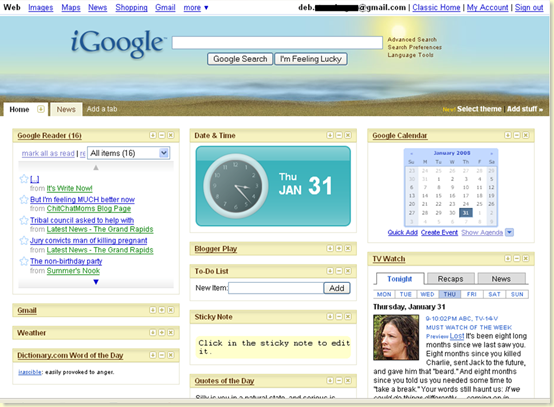
The nice thing about iGoogle is that along with your usual search bar and button, you can add all kinds of personalized content, such as weather, news/business/sports headlines, daily quotes or dictionary words - and other Google services such as your Gmail inbox, Google Calendar, and yes - your Google Reader. Here's a shot of what my iGoogle page looks like, so you can get the idea... I minimized a few of the different types of items so that you can see more of the page's content. You can see that I also have a separate tab just for 'News' headlines as well.
image

You can see my Google Reader items in the upper left (I have 16 unread items right now, or at least when I took the screen shot) and I can scroll down the list and click on any items that I want to read - they'll open in a little pop-up window. Or I can click on the 'Google Reader' title bar and Reader will open for me. To embed Reader in your iGoogle page like this, keep reading and I'll explain below.

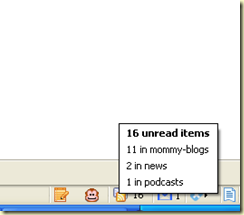
Another option to see if you have new content to read is a handy little add-on for Firefox called Google Reader Notifier (or here's one for any Windows user as well). When you install it, it puts a little RSS icon (remember that funny little orange one? See, it's everywhere!) down in the bottom right corner of your browser. If any of your feeds have new posts that you haven't read yet, it shows you the number of how many. And, if you hover your mouse over the icon, a neat little pop-up will tell you how many items you have in each of your Reader folders. Remember the 16 unread posts that I have right now? Here's what my Notifier icon shows me if I hover my mouse over it:
image

Wait a minute - you're asking what these 'folders' are and where they came from? Don't worry, they're easy to set up and as you can see, they give you a lot more information about your feeds and help you to better manage them. Very handy, especially if you (ahem) subscribe to a lot of feeds. But then again, I don't know anyone who does that, right? :)

Note: If you've been busily reading all of your feeds and have no new ones in your Reader, imageyour little Notifier icon will look something like this, with a sad little '0'. You can change your settings for how often it checks your feeds for new content, the appearance of your little icon, and other things by right-clicking on the icon.

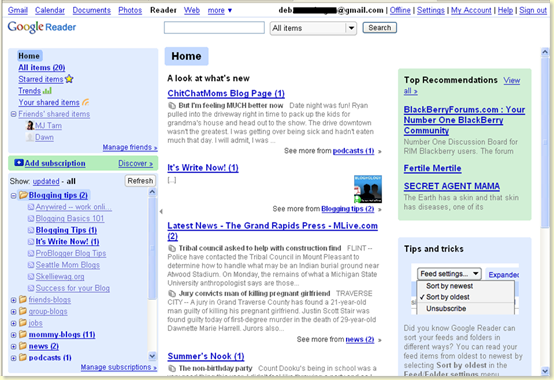
So here is what my actual Google Reader page looks like at the moment:
image

You can see a few things right off. First, that I'm now up to 20 unread posts (see 'All Items' in the upper left corner - it gives me the total number of my unread items). You can see the folders that I've set up on the left side - I expanded the 'Blogging tips' one so you can see the feeds underneath that I subscribe to. Two of them - Blogging Tips, and It's Write Now have new posts (one each) that I haven't read yet. I'm all caught up on the others. You can also see the breakdown of new posts in my other folders as well.

Note: Here's another way to see how many posts are in your reader... If you use the Google toolbar, you can add notifier buttons to it as well - thanks to Deb for pointing that out! She says, "I have my gmail and google reader on the toolbar so it shows when I have mail and the reader is green when there is a new post."

How do I actually read posts in my Reader?

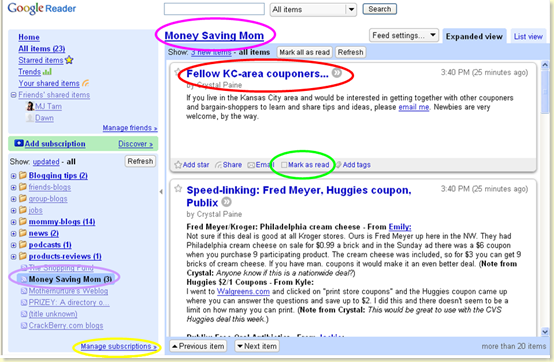
All you have to do in order to read a post then is to simply click on that blog's link in the list (see purple-circled item below). You can read the content, see pictures and, depending on how the blogger has their feed set up, you can sometimes even see comment counts or other options at the bottom of posts as well. As you scroll down, Reader will mark that you've now read that item and update your 'unread posts' numbers. But if you want, you can click on the little checkbox at the bottom of each post (see green-circled item below) to leave it marked as 'unread' - like if you want to skim something quickly but come back later and read it in more depth, but don't trust yourself to remember which site it was on (no, that never happens... LOL). If you want to visit the actual site, you can click either on the post title (see red-circled item below) to go to that specific post on the site, or click on the blog title (see pink-circled item below) to go to the site's main page. And oh yes, bloggers love it when you click through to visit and comment! :)
image

How do I use folders to categorize/manage my feeds?

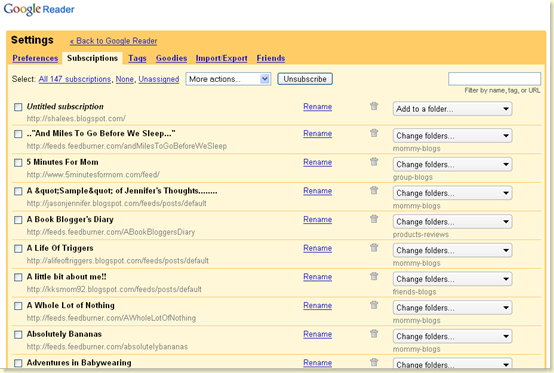
So you want to set up some spiffy new folders for your own feeds, but how do you do it? Well, it's very easy actually. Just click on the 'Manage subscriptions' link (yellow-circled item above). This takes you into your Google Reader settings, on the 'Subscriptions' tab. You'll see an alphabetical list of all your subscribed feeds and here you have the option to do many things, like unsubscribe (now don't get any ideas, LOL!), change the name that the feed displays by in your reader, and add your feeds to folders. You can create new folders by clicking on the 'Add to folder' button (it'll show the folder name beneath the button if the feed is already in a folder). And you can change which folder a feed is in any time you want as well. You can create a lot of different folders, or a few - it's completely up to you and what you prefer.
image

Note: There are a lot of other settings you can change in Google Reader as well - play around with it by clicking on the different tabs (preferences, tags, goodies, etc.) and see what works for you and what doesn't! You can also find fun things under the 'Goodies' tab - including how to embed Reader in your iGoogle homepage like I showed above, and the 'subscribe' bookmarklet that I talk about below.

You'll notice as you're busily skimming and reading all of the wonderfully-written posts in your Reader, that sometimes you can see the entire post, and sometimes you only see a portion or a short description of the post. Unfortunately, in these cases you do have to click through to the actual blog/post to read the whole thing. This is something that's up to the blogger him/herself - whether or not he/she wants to allow full feeds for his/her posts. There's a lot of reasons (and discussion and debate!) as to why or why not and I'll get into some of those in a later post.

What do I do if there's no RSS/Subscribe button?

Ok, so you're up and running in Reader now - you're keeping up with your favorite blogs and news sites and everything's working great. Then you find a wonderful site that you love, you go looking for the little RSS button so you can add it to your expanding list of subscriptions - and uh-oh, you can't find the button... Does this mean that you can't subscribe?

Not necessarily, but then again, that's up to the individual blogger. I've run into a few that don't allow you to subscribe at all. Or some may not be using Feedburner (or anything similar). Blogging platforms (like Blogger, Wordpress, etc.) do offer a feed for blogs - it's just not tracked or managed like you can in Feedburner (we'll get into how to set up Feedburner for your blog next time). What you'll want to look for is any kind of link that says 'Subscribe'. You imagemay see something at the very bottom of the blog's main page that looks like the one on my site (see left). Don't worry right now about what 'Atom' (or 'RSS' if you see that one) means - just click on this link and you can subscribe just as you would if the little icon were there.

I've also found a handy 'bookmarklet' for this as well - you can find it under the 'Goodies' tab when you're in your Reader settings page. If you add the bookmarklet to your bookmarks/favorites, then any time you find a site that you want to subscribe to, just click on the bookmarklet while that site's in your browser window, and it'll take you through the process (if the site has a feed).

Confused yet? Hopefully not, but please feel free to ask any questions that you've got in the comments below - or you can e-mail me at debmomof3(at)comcast(dot)net. For those bloggers out there who want to know more about how Feedburner works and how it can benefit you, stay tuned for Part 3! And don't worry, there will be some good stuff for everyone, including the non-bloggers, coming up as well. Remember to stay subscribed so you won't miss a single post! :)

For more information on using feeds, here are the sites that I listed last time, along with a few new ones which are more specific to what we've talked about today. If you know of any others, let me know in the comments below and I'll add them to the list.

From Under the Clutter - Everything You Need To Know About RSS
FeedBurner Help Center - Feed 101
Wikipedia article on Web feed
Google Reader Help - FAQ
Google Reader Blog (for news items and breaking news about anything 'Reader' related...)
Andy Wibbels - How To Use Google Reader
Wikipedia article on Google Reader

Vote for my post on Mom Blog Network add to sk*rt

Playing 'alphabet' tag

I was tagged twice for this meme - by Tammy and Amanda.

Rule #1

Copy all the links below and replace a single link under the appropriate alphabet. If your domain name, or even the title of your blog, starts with an ” A,” you’d replace the link under that alphabet and put the replaced link at the bottom. Also, don’t forget to credit the tagger, or where you got the list from, at the end of the list with a full URL of the post so that a pingback gets generated.

Since the lists from the two blogs I was tagged by aren't quite exactly the same, I put in both links where appropriate, so nobody loses the link love...

1. A. acowboyswife.com alwaysbcmom.com
2. B. bloggingcents.com
3. C. caffeine-overload.com
4. D. delusionsofgrandeur.com
5. E. everythingandanythingblog.com enjoyingtheride-jenn.blogspot.com
6. F. forumfinder.net
7. G. gotic-peach.net
8. H. happykeg.com
9. I. ipentimento.com
10. J. juliesjournal.com
11. K. kabalyero.com
12. L. ladylike4.com
13. M. momof3girls.net
14. N. notjustmama.net
15. O. originalmx5.net
16. P. patrickdevivo.com
17. Q. qweddings.com
18. R. rowdigrl.com rantingsofawoman.blogspot.com
19. S. shirleysdelight.com
20. T. thinking-outloud.com
21. U. utada-online.net
22. V. valmg.com
23. W. wickedbabylon.com
24. X. xaviermedia.com
25. Y. yimto.com
26. Z. zbudapest.com

Replaced links: momknowseverything.com mommymandy.com
Previous taggers: momknowseverything.com mommymandy.com

Rule #2

You now have to “tag” at least five people and encourage them to participate so that this thing spreads like a virus. Remember, though, that not everyone’s into these kinds of things, so don’t be upset if they don’t participate. Just simply replace your tag. Remember to tag blogs only and no pornographic ones as we do want to keep the integrity as a blogging community. TIP: Tag your frequent EntreCard droppers via its messaging system.

I'm going to tag:

Amber
Jen
Jenny/Emily
Gina
Holly

Rule #3

Just like any other “meme” out there, ask a question for your taggees to answer along with your own answer to your previous question. This is optional.

No, I'm not going to do this part, but you can if you want.

———–END HERE—————-

Vote for my post on Mom Blog Network add to sk*rt

Saturday, February 2, 2008

Me, myself and I

I sit in my living room - alone, and yet not. Downstairs there are two little girls watching a movie and having 'quiet' time. In her room, a third little girl naps plays by herself contentedly.

I love the weekend days when I am home with my girls all day. But even so, this mommy needs a break as well. An hour - maybe two, if lucky - to relax, watch tv, blog, and just to be me. Not a wife, not a mother, not an employee. Just Deb.

Which is why my girls, having either outgrown or outgrowing (unfortunately!) the afternoon 'nap', have their 'quiet' time in the afternoons, after lunch. This is as much for me as for them. Whether playing quietly in her room (Becca) in the hopes that she'll fall asleep, or watching a movie and playing (quietly - at least most of the time) downstairs, this is something that's been a part of their routing for as long as they can remember.

And it will continue to be - for as long as we can get away with it. They do need the break, the time to rest and recharge. But so do I. This time to just 'be' - to doze off if I need to, to blog if I want to, to catch up on my favorite shows if I have to, and to give myself a 'pass' on all of the chores waiting for me. This is not 'catching up on housework' time. This is my time.

And so I look over at the baskets of clean laundry waiting on the couch, at the toys scattered on my living room floor (that badly needs to be vacuumed), at the growing layers of dust that I can never seem to get rid of, and I smile to myself, because I sit here writing this post instead of doing the 1001 things that I know in my mind need to get done. They'll still need to get done an hour from now. But the difference is - an hour from now, I will actually feel more like doing them.

Because I've had (even a short) time to just be me.

This post was written as a submission for the January Group Writing Project over at MamaBlogga, on the topic of 'Me Time'.

Vote for my post on Mom Blog Network add to sk*rt

Contest round-up #22

Here is this week's contest round-up! :)

Phew, it's been an exhausting week of giving things away and entering contests... I think pretty much all of the ones over at Bloggy Giveaways have ended by now - so congrats to everyone who's won something! And for those of you who aren't 'contested-out', LOL, on to this week's contests:

Bloggy Giveaways will be back to business as usual next week - I'll update with contests as soon as they come out.

Over at 5 Minutes For Mom you could win a copy of the book Just Tell Me What to Say by Betsy Brown Braun, a Fairy Castle Set or gift certificate of equal value ($110.00) from the Warm Biscuit Bedding Company (enter by February 8th), an Insignia® - Pilot 4GB Video MP3 Player with Bluetooth Technology from Best Buy (enter by February 5th), a $100 American Express Gift Certificate from Capessa (enter by February 6th), a personalized towel from Alex Casey Baby (enter by February 7th), one of the great Land's End diaper bags which have been featured in contests around the blogosphere (enter by February 7th), or one of ten Safety Magnetic Memo Boards (enter by February 16th).

Also, keep the dates March 7th through March 14th in mind - it's the Ultimate Blog Party 2008! Right now you can vote for your favorite button design.

Check out An Island Life and An Island Review for Kailani's giveaways this week! You could win a t-shirt of your choice from Trendy Tadpole (enter by February 3rd).

Momsational is having several giveaways right now. You could win a $30 gift certificate to Baskin-Robbins Ice Cream! (enter by February 14th), a set of toys from Baby Jamz (enter by February 11th), one of 5 copies of the Brain Quest DVD Game (enter by February 10th), a BOB Screentime Controller (enter by February 8th), or one of 5 sets of great organic fruit snacks from FruitaBü (enter by February 12th).


Here's an awesome one - Karen at Pediascribe is giving away a $100 gift certificate to Amazon! You have until February 3rd to enter, so hurry over!

Check out MumsTheWurd - you could win an Action Scrubber from Scrubbing Bubbles (enter by 9:00 pm CST on February 3rd).

Metropolitan Mama is giving away an itzbeen Baby Care Timer by Coast Innovations (enter by midnight on February 4th).

Over at Z Recommends you could win a pink, size 3T belt from Myself Belts (enter by 11:59 pm CST on February 4th). Or you can enter to win the first season of Medabots on DVD (enter by 11:59 pm CST on February 5th).

Over at Seven Dogs and a Baby you could win a $50 gift certificate to Nina and Tom (enter by February 5th).

One Chic Mama is giving away a Laptop Messenger Bag - head on over to enter before midnight EST on February 5th.

If you've ever lost a pet, then you might be interested in this one - over at So a Blonde Walks Into a Review you could win a $75 gift certificate to Peternity. Enter by 11:59 pm on February 5th.

Do you lose things often? If so, this might be the giveaway for you. Over at Z Recommends, you could win a "Now You Can Find It!" key finding system from The Sharper Image. Enter as many times as you would like before 11:59 pm on February 5th!

Here's another chance at those great Land's End diaper bags! Over at MomReviews you could win one of four (2 'girl' pattern and 2 'boy' pattern) bags so hurry over and enter before February 6th.

Mamas Like is giving away a custom bow holder from I Wanted to Wonder (enter by February 7th). They're also giving away a Wriskey key ring (enter by February 9th).

It's the Birthday Blog Party over at GoodyBlog! Each week in February they're giving away awesome prizes - this week you could win a Kodak EasyShare M883 Zoom Digital Camera, along with an Eye-Fi digital camera card ($99), and a scrapbooking kit from EK Success (worth $342). Enter by February 8th!

Over at Blonde Mom Blog you could win a $25 gift certificate to Little Piddles (enter by midnight on February 8th).

Check out PenniesInMyPocket - you could win a $50 gift certificate to Quote the Walls! Enter by 11:59 pm PST on February 8th.

Success For Your Blog is holding a giveaway where you could win a 8GB USB Flash Drive! Submit your best blogging tip to enter before February 10th. My best blogging tip would have to be to treat your blog as a community and get to know your readers. Visit their blogs if they have them, respond to comments by e-mail as much as possible (I don't do this nearly as much as I wish I could!), and make your site someplace where people want to come back to visit. You can meet some wonderful people this way!

Are you thinking of starting a new blog, or changing either to a different blogging platform or a new template or design? If so, check out The Big Bloggy Move, hosted by After a cup of coffee and SortaCrunchy. New designs, sites or what have you will all be unveiled on February 11th.

Weary Parent is giving away an Insignia Pilot 4GB Video MP3 Player (enter by midnight on February 13th).

Over at Love Shak, Baby you could win a cubino chair from Mason & Matisse. Enter by February 13th.

Check out mod*mom to find out how to win one of 10 publish-your-own professional books from blurb. Enter by midnight on February 14th.

It's time for HGTV's annual Dream Home giveaway. This year's home looks incredible and is located in a real paradise, The Shore at Islamorada, in the Florida keys. You can enter every day through February 19th and a winner will be revealed live on March 16th at 9:00 pm ET.

It's time for the February Write-Away Contest over at Scribbit. This month the topic is 'Love' and you have until February 20th to enter. You could win a jar of cranberry hot chocolate mix, a bag of wild blueberry and white chocolate dipped pretzels and a jar of homemade Alaskan wild blueberry jam.

Sherry from Sher's Wares and Everything Moms is giving away a copy of the book I Love You More, by Laura Duksta and Karen Keesler. You have until February 23rd to enter!

I know that Mother's Day is still a ways away yet, but you might want to start thinking about a special mom that you could nominate in the America's Favorite Mom celebration, sponsored by Teleflora, NBC and Redbook Magazine. On www.americasfavoritemom.com, you can nominate mothers to win several prestigious awards by simply uploading videos, favorite photos or essay testimonials. You can nominate your own mom or any mom, and the top 15 nominees will appear on NBC’s “The Today Show” throughout the week before Mother’s Day. Viewers will then have the chance to vote for their favorite mom at the end of each show. The winning mom from each day of the week will be featured on a one-hour primetime NBC television special airing on Mother’s Day, May 11, 2008. On the special, “America’s Favorite Mom” will be crowned, a rose will be named in her honor and she will also receive thousands of dollars in cash and prizes (including an 18k gold heart-shaped America’s Favorite Mom pendant trimmed with dazzling diamonds).

As usual, if you know of a contest or giveaway that I missed, just e-mail me or leave a comment below and I'll add it in! Enjoy and good luck! :)

Vote for my post on Mom Blog Network add to sk*rt